Is MAS updating it’s own Wikipedia page?

9M-MPL Boeing 747-400 MAS

Continuing my series on bigdata and Google bigquery, I’ve decided to share a rather interesting snippet of information regarding our very own Malaysian Airlines and their wikipedia page.

First, just to illustrate how important Wikipedia is in general, the Malaysian Airlines Wikipedia page gets roughly 30,000 hits per month. That’s just one page of Wikipedia getting more hits than my entire website, I can’t tell you how frustrated that makes me.

Having a negative sounding Wikipedia page is pretty bad for business, particularly if 30,000 potential customers view it every month. That’s a web page that needs some serious attention if you’re the marketing manager of Malaysian Airlines.

Unfortunately for MAS (and every business organization there is), Wikipedia has a policy about updating your own Wikipedia page–you’re not allowed to do it. Wikipedia has to keep to it’s original intention of being an online repository of information that is fair, balanced and neutral. Having marketing gurus or corporate big wigs updating their own Wikipedia entry isn’t exactly in the best intentions of anyone, however Wikipedia doesn’t strictly enforce the policy and leave it up to the crowd.

Fortunately, the crowd have responded, sites like WikiScanner allow users to see which IP addresses updated which Wikipedia articles. Some have gone to the extent of correlating those IP addresses to the owners and determining if companies are updating their own Wikipedia pages against the general guidelines. Let’s see if Malaysian Airlines can join that group of companies who’ve been slapped on the wrist for changing the Wikipedia pages of their organizations.

[Read more]

Wikipedia from a Malaysian perspective

Wikipedia is quite possibly the greatest repository of information mankind has ever seen. It’s built around an amazing concept of allowing anyone the ability to create, document and moderate information in real-time, and so far the concept has proven successful–some may even argue that it’s too successful.

For the past two days, I’ve been writing about Bigquery and Big Data in general, and for the most part I’ve been using the freely available wikipedia dataset in Bigquery to perform some queries and analysis. The results were so interesting, that they warrant a post on their own–and this is that post!

For instance, I was curious who Aiman Abmajid was. For those who aren’t following the blog, Aiman is the undisputed King of Wikipedia in Malaysia. Aiman has single-handedly helped update Malaysian articles on Wikipedia a mind-blowing 13 THOUSAND times–and that’s just the English articles. Almost 6 times more than his closest Malaysian rival.

I was intrigued as to who he was and why was he updating so many Wikipedia entries (some more than 900 times per article), and more I dug the more intriguing it got.

A quick Google search, brought me his Wikipedia which led me to the following:

[Read more]

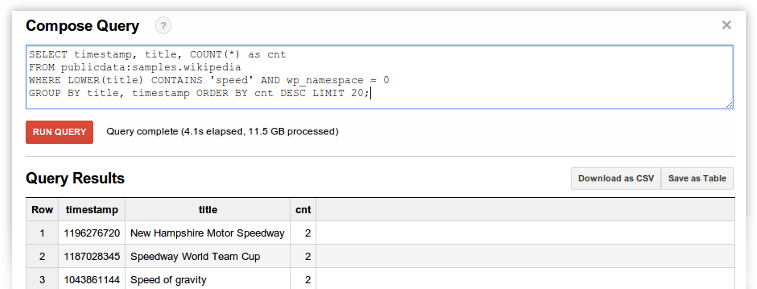
Google bigquery

Google-bigquery-whatisit

There are other more popular tools for big data, but today we’ll focus on Google BigQuery for a very good reason. It’s the only one I know how to use.

Google BigQuery is a full fledge big data tool developed by google and stored on the cloud. There’s a lot more information you can glean from their presentation here. The short story is that Google created this tool online where you can analyze your bigdata for a per use fee, similar to other cloud offerings. Google currently charges $0.035 per GB of data processed or $35 per TB of data. That seems like a small fee, but it adds up pretty quickly, so for the moment bigdata and bigquery aren’t exactly end-user offerings.

I’m just going to quickly jump into a worked example of Google BigQuery before making some remarks. To use BigQuery, you’re first going to have to create an API project in Google and then go to https://bigquery.cloud.google.com

[Read more]

What is big data

big-data-getting-bigger

It’s obvious that people have gotten bigger these past few decades, what’s less obvious is how data has grown bigger in the past few years. In fact, 90% of the digital data we have today, was created in the last 2 years. Put another way, in 2010 we had just 10% of the digital data we have today.

In 2011, an estimated 1.2 TRILLION Gigabytes of data was created. That’s roughly 200GB for every man women and child in the world–In just one year. That’s every person in the world watching almost 300 feature length films every day, and this is the average.

The reason is simple, we now keep digital records of our transactions (e-banking and credit cards), our running patterns, our spending habits and even our wedding photos–and that’s just commercial end user applications.

What about corporations who track thousands of data points per second for their manufacturing plants and supermarkets tracking the purchases of customers. We’re creating and gobbling far more data than before, and the trend doesn’t look to be stopping. Every day, we create 2.5 quintillion bytes of data — so much that 90% of the data in the world today has been created in the last two years alone.

[Read more]

How to change your Unifi password

Now It’s quite clear from a previous post I did how about easy it was to hack a Unifi Dlink DIR-615 Wi-Fi router, that the least you should do is change your standard router password to something that’s more than the regular 8 digit Pin Unifi gives you by default.

Let’s take a look at how to change your unifi password, or how to find it in case you’ve forgotten.

Step 1: Login to your router

First you’ll need to login to your router. For this open up Internet Explorer or Firefox or Chrome to access the internet. Then instead of typing something like http://www.google.com in the address bar to visit google, type http://192.168.0.1 in the address bar to visit your routers web server. Your router actually has a webpage that allows you configure you, but this web page is only visible from within your home network so don’t worry.

You can just click the link here to take your there as well.

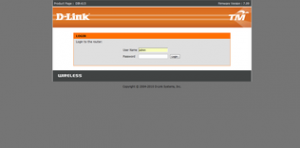
Once you see the page look something like the picture above, enter admin for the username. For the password, use the default password Unifi has given you, when in doubt, look at the bottom of your router (that’s the orange color device with the 2 antennas) and look for an 8 digit PIN. That’s your default password. It’s printed there in big bold letters–you can’t miss it.

Now don’t be confused, this is merely the password to access the router, not your Wi-Fi password, for now their the same password, but they could be different. That’s what we’re going to do.

If the password at the bottom of your router doesn’t work, try the following. Depending on your router firmware, one of them is bound to work:

Username: Management Password: TestingR2

Username : operator Password : h566UniFi

Username : operator Password : telekom

[Read more]

When Lightning strikes the Cloud: Amazon Outage

Google recently announced their Amazon EC2 killer, the Google Compute Engine or GCE. Google wasn’t messing around and went straight for the Amazon jugular releasing 4 instance types all of which appear cheaper than their Amazon counterparts. That being said the price comparison was done solely on the basis on a on-demand Amazon instance types–Amazons most expensive prices, if you compare for the Reserved instances, then prices become more competitive.

It’s exciting to finally see a Juggernaut big enough to take on Amazon in terms of price and scale. This is all around good news for everyone, especially since this report from Cisco estimates that revenues from IaaS providers are not only high right now, but will continue to grow over the next 5 years. There’s a lot of room at the IaaS space, and Google just wants to wet their beak here as well.

So it must have come as a pleasant surprise to Google when they heard ‘hurricane-like’ thunderstorms ripped across the US east coast taking down power to 3.5 million–and the Amazon East Data center as well. I was personally affected by this phenomena when my access to Netflix was abruptly halted, as you can imagine I wasn’t a happy camper.

How to enable VPN connectivity on Maxis Mobile

[caption id=“attachment_2505” align=“aligncenter” width=“271”]

Maxis VPN Setting[/caption]

Just a quick post for a Wednesday, as most of you know I just recently purchased my Samsung Galaxy S3 courtesy of the Maxis One Club. With that S3, I also purchased a RM68/month mobile data plan for 3G.

Now for those of you with an Android phone that tethering on the Phone is super easy. Tethering is when I use my phone as a wireless router for my laptop (or any other device). So I’m connecting my laptop to the internet via my phone and the Maxis network.

[Read more]

What I learnt from winning the DigiWWWOW awards

[blackbirdpie url=“https://twitter.com/DiGi_Telco/status/211447275891855361”]

Exactly one month ago, I was honored to be awarded the DigiWWWOW awards Fave tech Head award. It was truly unexpected and I continue to feel grateful for it. For those of you who don’t know what the DigiWWWOW awards is, it’s basically like the Grammy Awards for Malaysian blogs, so instead of singers and producers being awarded gold statues, the DigiWWWOW awards present bloggers a cool looking glass plaque with our title on it. My award is currently sitting on my bookshelf between an Optimus Prime Model and a yellow Ferrari car.

I’m officially on Nuffnang

If you didn’t already know, there’s something on the sidebar of this site, something that hasn’t been there before. Something that I’m not particularly happy to put on my site– it is – an Advertisement!!! (gasp!)

To be more specific it’s a nuffnang add, about 10 lines of javascript code that will for the next couple of months display ads to visitors of this sites. I’m not too familiar with ads, but from what I gather I have little control over who will display ads on this site, and that’s the part I’m not particularly happy with. Aside from the usual “No alcohol” and “No tobacco” options, I couldn’t really control who I would not like to advertise on my site.

So why put ads, especially when I claim the blog cost under $4 a month?

First the blog does cost less than 4USD per month, and second it isn’t about making money–but money is still nice to have – it’s about taking this to the next level.

What is Nuffnang anyway?

Nuffnang approached me last week, and suggested that I join their network. They described it as a platform and community for Malaysian bloggers to 'unite' and provide a social and communitarian aspect to an otherwise dispersed group of bloggers working in silos. Of course, companies have to pay the bills and the whole community/social aspect of Nuffnang is funded by advertisers who view blogs as another way to reach their target audiences. Over time, blogs will slowly creep into the mainstream advertising space to compete with print and televised ads (if they haven't already).
[Read more]

OpenSource Gold: The greatest Crowdsourcing story ever told

Crowdsourcing is a funny term, and people often ask me what does crowdsourcing have to do with technology, to which I reply–EVERYTHING!

Without the vast internet and communications made possible by it, crowdsourcing would be a fools dream. Right now, I work in an environment so virtual that the first time I met my project manager face to face was last week at a conference, a full 6 months after the project started. It’s a really exciting time, because it allows people to work in a boundary-less world.

The internet and technology enable crowdsourcing, without the internet, there is no crowdsourcing. It gets more interesting because as more and more big world problems emerge, crowdsourcing may become an acceptable way to solve them–all enabled via technology and the internet although crowdsourcing in itself is not technological.

This great video from Don Tapscott (author of wikinomics), really provoked in me some thinking on how we approach data and information.

In about the 4th minute you'll notice Don tell a story of his neighbour, the CEO of Goldcorp and how the crowdsourced the method of Gold Mining. The story is amazing, and be found in detail here and here.

It’s amazing, and here’s how it goes.

The story of the Goldcorp challenge