Now It’s quite clear from a previous post I did how about easy it was to hack a Unifi Dlink DIR-615 Wi-Fi router, that the least you should do is change your standard router password to something that’s more than the regular 8 digit Pin Unifi gives you by default.
Let’s take a look at how to change your unifi password, or how to find it in case you’ve forgotten.
Step 1: Login to your router
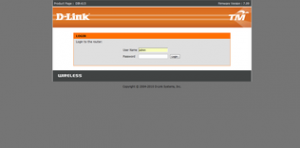
First you’ll need to login to your router. For this open up Internet Explorer or Firefox or Chrome to access the internet. Then instead of typing something like http://www.google.com in the address bar to visit google, type http://192.168.0.1 in the address bar to visit your routers web server. Your router actually has a webpage that allows you configure you, but this web page is only visible from within your home network so don’t worry.
You can just click the link here to take your there as well.
Once you see the page look something like the picture above, enter admin for the username. For the password, use the default password Unifi has given you, when in doubt, look at the bottom of your router (that’s the orange color device with the 2 antennas) and look for an 8 digit PIN. That’s your default password. It’s printed there in big bold letters–you can’t miss it.
Now don’t be confused, this is merely the password to access the router, not your Wi-Fi password, for now their the same password, but they could be different. That’s what we’re going to do.
If the password at the bottom of your router doesn’t work, try the following. Depending on your router firmware, one of them is bound to work:
Username: Management Password: TestingR2Username : operator Password : h566UniFi
Username : operator Password : telekom