Posts for: #Malaysia

Personal Data Protection Act 2010 Malaysia

[box icon=“chat”]

Data is the natural by-product of every computer mediated interaction.  It stays around forever, unless it’s disposed of.  It is valuable when reused, but it must be done carefully.  Otherwise, its after-effects are toxic. - Bruce Scheneier

As society moves towards a ‘knowledge’ based society, data naturally becomes a by product. Every action you perform leaves a tiny digital trail like breadcrumbs in the forest, and just like though breadcrumbs each individual data point is insignificant, but piece them together–and you’ve found you way home.

What we use to buy we cash, we now buy with credit cards – with every swipe, digital data is created and stored, it records the amount of the transaction, where the transaction took place, and the banks bill the customer, which means it can tie it to an address a person, their age, their income and even their preferences.

Photos were physical things we could only share in person,but now we share them digitally on social networks–all those photos are stored–permanently, and they’re tagged with meta data regarding the photos location and the names of people in the photo. A lot more data, and a lot more public. Even if you randomly stumbled across a photo on Facebook, chances are you could easily find out who the people in the photos were, and where the photo was taken–that wasn’t the case before digital photography.

When we use to pay toll booths in cash, we now use touch N’ Go, so there is a full blown record of where we travelled and at what time. Coupled with the CCTV footage they can even identify which vehicle you used. Tie that with your credit card and we can determine where you fueled before you got on the highway, coupled with CCTV footage from the Fuel station we know how many people were in the vehicle. Look at the JPN records and we’ve got the car owners name, and contact information, a quick search on Google reveals his profession on LinkedIn, his favorite places from tripadvisor, his friends on facebook, and if we pay close enough attention to his tweets chances are we can find out which football team he supports or which political party he’s aligned to.

What used to be something you’d only reserve for your close friends at the kopitiam now is public knowledge, provided some one takes the trouble to Google your name.

And the list literally goes on and on, and all these add the amount of our personal data stored digitally online–data that can be used to determine who you are, where you are, what you like, what your political beliefs and religious inclinations–even your medical history and sexual orientation. I’m not kidding, there’s a story I love to link to which tells of a supermarket who knew a teenager was pregnant before her father did.

One of the biggest abusers of personal data has been advertising companies and mail-order folks, the people that spam you day in and day out with emails about viagra and cheap housing loans, however as time goes on a lot of other people are getting on board, like insurance companies who want to know more about your medical history or driving records, banks who wish to determine if you’re really eligible for a loan–even a supermarkets may have a direct interest in your personal data.

It has become imperative that we as users look towards protecting our data online, but there also is an imperative for governments to regulate the way our data can be used–even by governments themselves (or ESPECIALLY by the government).
[Read more]

How to change your Unifi password

Now It’s quite clear from a previous post I did how about easy it was to hack a Unifi Dlink DIR-615 Wi-Fi router, that the least you should do is change your standard router password to something that’s more than the regular 8 digit Pin Unifi gives you by default.

Let’s take a look at how to change your unifi password, or how to find it in case you’ve forgotten.

Step 1: Login to your router

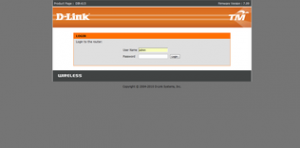
First you’ll need to login to your router. For this open up Internet Explorer or Firefox or Chrome to access the internet. Then instead of typing something like http://www.google.com in the address bar to visit google, type http://192.168.0.1 in the address bar to visit your routers web server. Your router actually has a webpage that allows you configure you, but this web page is only visible from within your home network so don’t worry.

You can just click the link here to take your there as well.

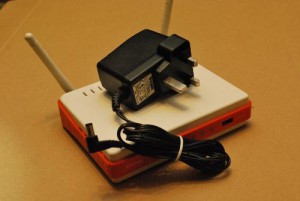
Once you see the page look something like the picture above, enter admin for the username. For the password, use the default password Unifi has given you, when in doubt, look at the bottom of your router (that’s the orange color device with the 2 antennas) and look for an 8 digit PIN. That’s your default password. It’s printed there in big bold letters–you can’t miss it.

Now don’t be confused, this is merely the password to access the router, not your Wi-Fi password, for now their the same password, but they could be different. That’s what we’re going to do.

If the password at the bottom of your router doesn’t work, try the following. Depending on your router firmware, one of them is bound to work:

Username: Management Password: TestingR2

Username : operator Password : h566UniFi

Username : operator Password : telekom

[Read more]

How to enable VPN connectivity on Maxis Mobile

[caption id=“attachment_2505” align=“aligncenter” width=“271”]

Maxis VPN Setting[/caption]

Just a quick post for a Wednesday, as most of you know I just recently purchased my Samsung Galaxy S3 courtesy of the Maxis One Club. With that S3, I also purchased a RM68/month mobile data plan for 3G.

Now for those of you with an Android phone that tethering on the Phone is super easy. Tethering is when I use my phone as a wireless router for my laptop (or any other device). So I’m connecting my laptop to the internet via my phone and the Maxis network.

[Read more]

What I learnt from winning the DigiWWWOW awards

[blackbirdpie url=“https://twitter.com/DiGi_Telco/status/211447275891855361”]

Exactly one month ago, I was honored to be awarded the DigiWWWOW awards Fave tech Head award. It was truly unexpected and I continue to feel grateful for it. For those of you who don’t know what the DigiWWWOW awards is, it’s basically like the Grammy Awards for Malaysian blogs, so instead of singers and producers being awarded gold statues, the DigiWWWOW awards present bloggers a cool looking glass plaque with our title on it. My award is currently sitting on my bookshelf between an Optimus Prime Model and a yellow Ferrari car.

[Read more]

I’m officially on Nuffnang

If you didn’t already know, there’s something on the sidebar of this site, something that hasn’t been there before. Something that I’m not particularly happy to put on my site– it is – an Advertisement!!! (gasp!)

To be more specific it’s a nuffnang add, about 10 lines of javascript code that will for the next couple of months display ads to visitors of this sites. I’m not too familiar with ads, but from what I gather I have little control over who will display ads on this site, and that’s the part I’m not particularly happy with. Aside from the usual “No alcohol” and “No tobacco” options, I couldn’t really control who I would not like to advertise on my site.

So why put ads, especially when I claim the blog cost under $4 a month?

First the blog does cost less than 4USD per month, and second it isn’t about making money–but money is still nice to have – it’s about taking this to the next level.

What is Nuffnang anyway?

Nuffnang approached me last week, and suggested that I join their network. They described it as a platform and community for Malaysian bloggers to 'unite' and provide a social and communitarian aspect to an otherwise dispersed group of bloggers working in silos. Of course, companies have to pay the bills and the whole community/social aspect of Nuffnang is funded by advertisers who view blogs as another way to reach their target audiences. Over time, blogs will slowly creep into the mainstream advertising space to compete with print and televised ads (if they haven't already).
[Read more]

Apple Launches iTunes Store in Malaysia

Finally… it’s arrived!!

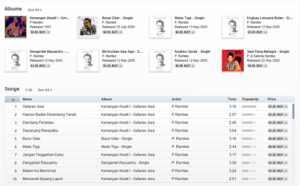
It was a long wait since my first iPod, but finally the iTunes has landed in Malaysia. Apple made a rather quite launch of the iTunes Store in Malaysia, meaning the days of logging into iTunes with US accounts and gift card purchases are over. Malaysians now have access to an entire treasure trove of songs available for the same prices as they are in the US. That’s about $0.99 - $1.69 per song, or $9.99 per album (roughly).

I was so excited, I immediately logged onto iTunes with my Malaysian account to check out the details, it took a while, since I’d forgotten my Malaysian account password, but soon after I was greeted at the iTunes store by Jason Mraz himself. I was also informed that the iTunes Store in Malaysia had more tailored local content these include songs from P. Ramlee, Man Bai, Chinese songs as well as Hindi songs (kuch kuch hota hai for $0.69 anyone?). It’s also good to see that Kau Ilhamku by Man Bai was Top of the Charts, signifying locally driven content. Where else would you see Belaian Jiwa and Moves Like Jagger on the same charts?

Also there are more P. Ramlee songs on the Malaysian iTunes store than there is on the US iTunes store, so it’s tailored to Malaysian taste.

Of course that raises the questions, are there more ‘American’ songs on the US store than Malaysia?

[Read more]

Is your Wi-Fi safe?

With the newly enacted Evidence Bill Amendment, you would have been deemed to have published everything that originates from your IP address. What that means is that if someone hacks your Wi-Fi and then uses it to publish malicious or seditious statements online, you will be deemed to have published it, and the onus is on YOU to prove you’re innocence rather than for the prosecution to prove your guilt.

So obviously with the new law floating around, Wi-Fi security should be at the top of every Unifi Subscribers agenda–if it isn’t already.

However, how secure is your Unifi Wi-Fi connection?

The short answer is not so secure.

The brilliant blog Lifehacker recently posted an article on how you can hack Wi-Fi connections secured by a WPA or WPA2 password. The post is quite detailed but even I have to admit the technical skills neccessary to pull this off is somewhere between intermediate and expert. At the end of the post is a link to a spreadsheet detailing all the devices that are susceptible to this hack, and one of those devices is the DLink Dir-615 Wi-Fi router, if it doesn’t sound familiar let me refresh your memory–it’s the router that Unifi gives out to all Unifi customers!!! (que bone-chilling Alfred Hitchcock Movie sound)

Now taking aside the fact, that I could probably call all Unifi customers to request the Wi-Fi password printed at the bottom of their router, and 50% would probably provide that to me with no issue, this also means that for those people smart enough to hide their passwords – I can still hack your Unifi Wi-Fi connection no matter what you do on your router. There’s literally nothing you can do, hiding SSIDs don’t work and neither will MAC address filtering. Of course this is all theory, and testing this theory took a lot more time than I had, so I’m not sure.

What I am sure is that Unifi have their own firmware for the DIR-615 router, and that’s a partially susceptible router, meaning some firmwares are susceptible some firmwares aren’t, and it’s a coin toss and whether your router at home is susceptible.

Now, while I know of a few people who hack Wi-Fi passwords just for the fun of it,and there’s a lot of references and material online detailing the steps required–so we all know this works. In fact you can buy packages online that allow you crack the routers easily :). This blog written in Malay claims that they’ve successfully hacked a DLink Dir-615 router, I’ve no doubt it’s possible, but it’s not easy and it takes time.

Either way though, it’s always good to remember this. There is no such thing as impossible to crack, merely inconvenient and infeasible. Don’t believe me? Check out this story of how a group of University Students manage to hack a US Military Drone in mid-flight using nothing more than $1000 worth of equipment, do you really think your Wi-Fi at home is more secure a ‘death from above’ US Predator Drone? Every Wi-Fi access point hackable, it’s only a matter of how much time, effort and money is required.

[Read more]

Samsung Microsoft Surface in Malaysia

This week I was attending a Project Delivery Conference in Putrajaya and was neglecting my blog a bit. The last post on the blog was more than a week ago, and that falls short of my target of 2-3 post a week. That being said, I do have some cool stuff that I’d thought you might be interested in.

Samsung Microsoft Surface

The first one is the awesome!! Samsung Microsoft surface device that was displayed. This thing was cool, it was an enourmous tablet with cooler features, check out the video below (filmed with my samsung galaxy S3), also forgive the sound quality and video angle (I'm not a professional you know). The first part of the demonstration is how he used the surface to compare 2 different laptops, by just merging their 'tiles' together, after that a microsoft specific QR code format pops up that the user can scan and save on their smartphone for further viewing (without the need for the surface). The last part demonstrates how every pixel on the screen is also simultaneously a camera with the ability to pick up coded objects and display information about those objects. The surface was cool, but I really can't think of practical applications other than the next Iron Man movie, and at a Rm40,000 price tag--it's way beyond my budget.
[Read more]

Is Dowloading a banned ebook illegal?

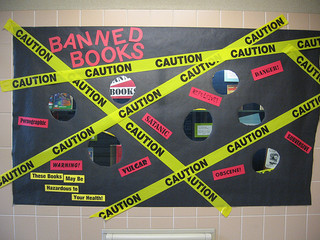
Let’s get straight to the point, the latest case where the Federal Territory Islamic Affairs Department (Jawi) is prosecuting a store manager is both disgusting and without merit. Not only is she just a Manager carrying out here duties–thereby making the bookstore liable instead of her, but the raid on the bookstore was carried out BEFORE the book was banned by the Home Ministry. So here in Malaysia, not only will the Government be able to persecute you in a guilty until proven innocent manner, but apparently government agencies can persecute for possession of a book before it is banned.

However, politics aside, let’s talk technology!!

What if I used Technology to bypass all government censorship. So instead of buying the book from Borders (or MPH, Popular or Kinokuniya for that matter), I simply download the Kindle version of the book online?

I did an online search, and indeed found that Amazon has a Kindle version of the book retailing for $11.99, if you already own a Kindle in Malaysia, then you can bypass all this drama and simply download the book to your Kindle. Of course, there are legal concerns with just downloading regular books from Amazon, much less banned books–so be warned!!

Now I wouldn’t recommend it and there are huge legal questions, but technically–it can done, and it can done easily. I’m start to finish in 5 minutes–it really is that easy.

My point isn’t that the book should or should not be banned, my point is that the ban can be circumvented with ease using technology. So how effective can any ban be, when most Malaysians have access to the internet?

On top of this is a very interesting question, Does a banning a physical book constitute internet censorship–probably not. However, does banning an electronic book constitute internet censorship? Of course you may say the law makes no distinction between and e-book and an actual physical book, but the law makes no distinction between and ebook and webpage either (they’re all considered publications), and if banning a webpage is obviously internet censorship, isn’t banning an ebook internet censorship as well?

The question I believe can be synthesized into Does Banning and ebook constitute censoring the internet? I don’t have the answer, but I believe there are 2 aspects:

  1. The Traditional legal aspect as covered by the Printing and Publications act 1984.

  2. The goverment promise as outline in the MSC Bill of Guarantees to not censor the internet.

If you’re a lawyer, I would love to hear your comments.

[Read more]

Finally got my Samsung Galaxy S3

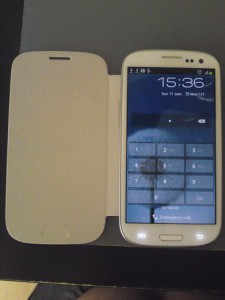
Finally after a long long wait, I managed to get my Samsung Galaxy S3 from Maxis. I got the phone last Wednesday and now after just 5 days with it, I have to say – best Rm999 spent EVER!

For those of you still curious as to how I got it for Rm999 when I recently complained about Maxis advertising a “while stocks last promotion” as a “4 day long promotion”, here’s a nifty little piece of information that isn’t widely shared, Maxis is STILL offering the Samsung Galaxy S3 for Rm999 but only to Maxis One Club subscribers, you’d still need to subscribe to the Rm68 data plan which brings with it a good ol’ 3GB of mobile data, but any smartphone needs a data plan anyway. The maths is simple, you’d need a minimum Rm48 data plan which is for 1GB/month, so the difference between the Rm68 and RM48 is Rm20/month. Over the 2 year contract, that’s a Rm480 difference, the phone price itself is nearly Rm400 cheaper. So might as well, if you ask me.

[Read more]