Asus N12 HP: The best Unifi replacement router?
Update: 20-July-2014
Since writing this post, my 1-year old Asus router begun experiencing issues with its WiFi. My devices couldn't connect via WiFi, although the wired-Ethernet connections were fine. I called up Asus and they confirmed that my router was still under warranty, however I tried sending it to the many service centers listed on their websites to claim my warranty, I was told I couldn't do it. The only way for me to claim the warranty was to send it back to the Asus service center in Imbi Plaza, right in the heart of KL near the collapsed road.I can’t recommend this router because the after sales service from Asus is terrible. The router cost just Rm199, but for me to claim my warranty would require a 1-hour car ride to KL, the cost of petrol, toll and parking would easily exceed RM40/trip, and I’d have to make 2 trips (might as well buy a new router at that point)/ I emailed Asus hoping they’d at least provide some other way of claiming warranty–postage for example, but they’ve re-iterated that I’d still need to go to Imbi to claim the warranty.
Bad service–and the quality of a router that fails after just a year is suspect as well, the D-Link Dir-615 router I have still works, but this more expensive router failed after just a year?!!
Wouldn’t touch Asus routers ever again! I’ve left the initial post below for you to view, but I would recommend TP-Link routers instead.
Screenshot of the 3 Asus service centers in Klang–none of which are service centers anymore (their contracts have expired), and Asus should remove them from the website.
[caption id=“attachment_4496” align=“aligncenter” width=“550”]
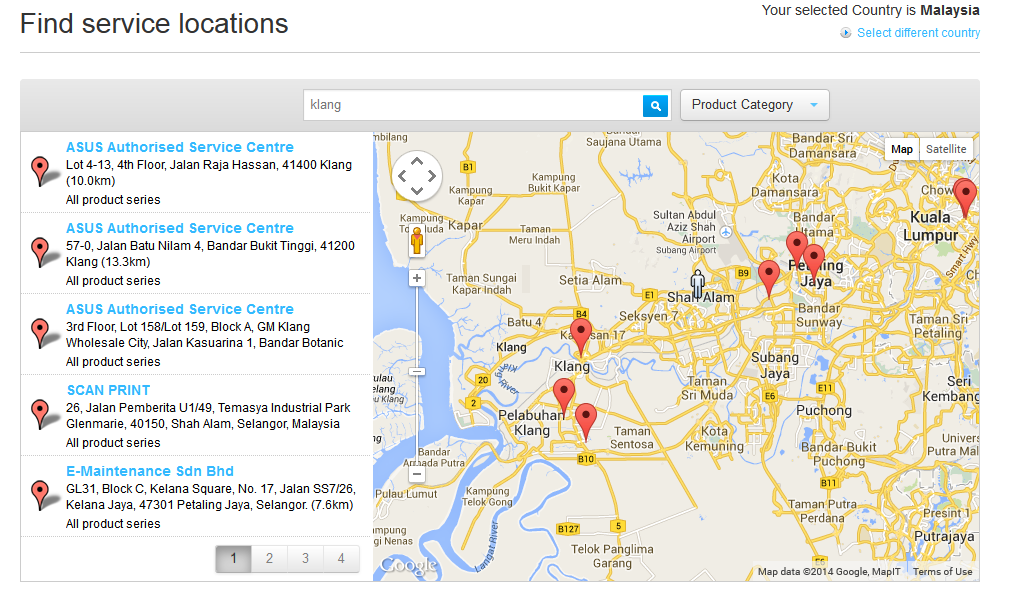
None of these are service centers anymore[/caption]
Original Post below this line:
[caption id=“attachment_4003” align=“aligncenter” width=“550”]
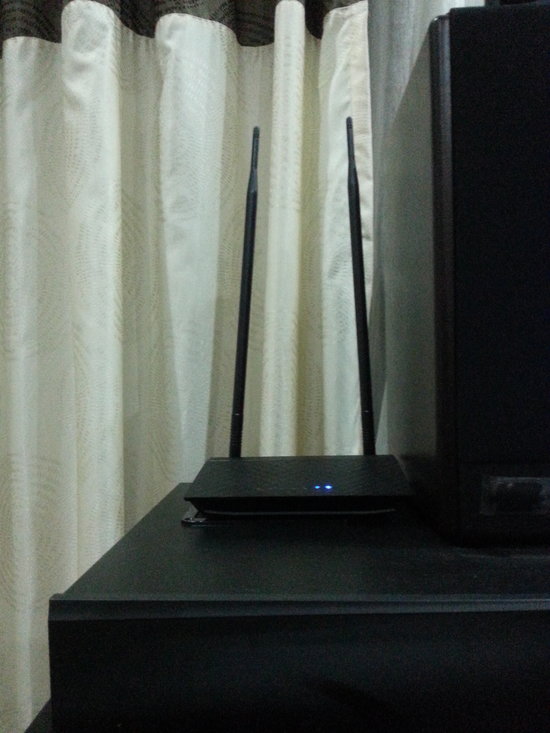
My rather un-professional grainy picture of the Asus router. Look at how Tall it is.[/caption]
The first thing you notice about the Asus N12HP is that it’s TALL, and I mean like if Yao Ming married Kareem Abdul Jaabar and had kids it would like this router. Those long antennas really make the router look like a child who’d undergone a growth spurt in the all the wrong awkward places.
Now don’t get me wrong, the standard D-Link router that TM provides you FOC with every Unifi connection is actually a pretty good router, but if you want something with a bit more oomph! then you may have to look to Asus to provide that. Is it really worth changing your Dlink, and is the Asus N12HP really the best replacement router out there?
Well…for one thing, this router Looks Good.
It looks good
When it comes to routers--black is the new black!My Unifi router, just like yours is probably located near my TV , and unless you’ve got a old CRT from the 1960’s–your TV is black. So you want a router a matches your living room, and not stand out. Apart from it’s awkward height, the Asus really fits in with my HTPC and speaker set, and it should blend in nicely with any Home Theatre system, unlike the ugly white plastic-ky feel of the Dlink.
Not only does it look Gorgeous, it has a modern looking matte finish with diamond pattern for extra ‘oomph’.
The only downside could be the Blue LEDs, some people love them, some people hate them. I’m pretty impartial.
Those long antennas really extend the range
Asus does have a full range of routers though, from the very basic N12, to the feature rich Asus RT N66U, and while you may be able to afford that Ferrari--that doesn't mean you should buy it. Just like everything else, the features on the routers commensurate with price, the basic N12 cost slightly more Rm100, while the feature rich N66U could set you back a whooping RM600. So do you need the features, well it depends entirely on what sort of internet user you are--and how much you've got in the piggy bank.The basic N12 is a entry model router that comes with all the features you expect on a basic router, however, the N12 HP comes with two 9DB antennas, that Asus promise would increase your WiFi range by 300%. I’m guessing the HP suffix stands for High Powered!
Do they really extend the range? In a word–Maybe. Your router range can be increased by placing your router in a different location or elevation, just sticking two large giraffe-neck long antennas on a device isn’t going to make it work much better if your router is behind a metal TV set.
So the antennas will help, but only after you’ve addressed some other issues as well. However, as compared to the DLink, this router has got tonnes more power, and should have much better range and coverage.
Price point
The High Power though comes at a price--the N12 HP cost nearly RM200, while the regular N12 cost about half the price with the exact same feature set. Are those twin 9dB antennas really worth the extra Rm100?There were also the N13 and N15 routers, which come with USB ports and a few other bells and whistles–but with only one detachable 5dB antenna. I don’t know about you, but I’m one of those guys who just gets annoyed when my neighbours WiFi is stronger than mine–in my OWN HOME!
So if your male ego is directly tied to the strength of your WiFi–then you really should be going for the N12 HP router–even though those abnormally long antennas make it look like a black Yao Ming. If you’re living in a dense condo or flat, and your WiFi is competing with 20 of your neighbours for those precious wireless channels, this router could be the answer to basically over-powering that annoying neighbours Wifi. Also, you could use it to broadcast messages via SSID, simply create a guest WiFi network, and name it something like “StopListeningToJustinBieber”.
However, you also have to keep in mind, that while this is a slightly more premium priced router, the features are basic. You’re essentially paying for a basic router with improved wireless signal strength, that’s it!
So how powerful is the Signal strength
Since I only had one Asus router for comparison, I could only run a comparison of the Asus against the stock Dlink and the results were impressive:

That being said, your Dlink is nowhere near as powerful as the N12HP.
The RT N12HP is really fast
Of course signal strength is just a number. I wanted to see how the routers would compare in file transfers. Unfortunately, this isn't so straight forward--the D-Link router only supports 802.11g (although it 'claims' to support the draft version of 802.11n), while the newer Asus supports the 'real' 802.11n, the different protocols really make this an unfair competition.Just how unfair?
Well transferring a 700+MB file over WiFi yielded the following results:
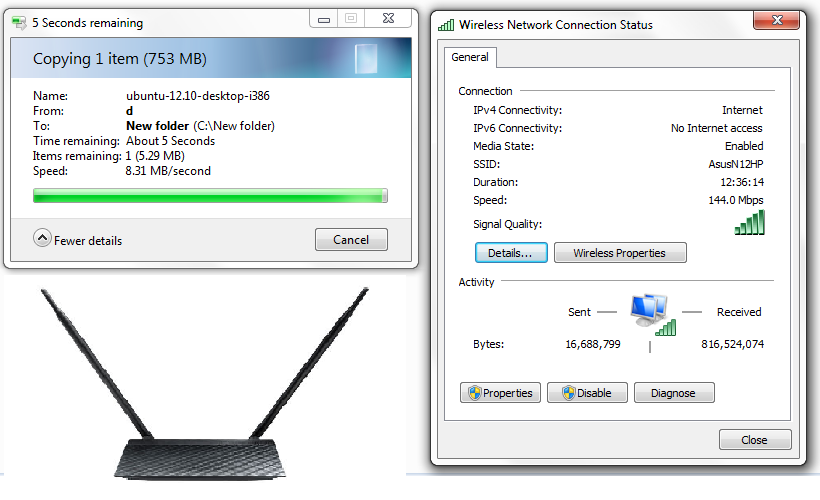
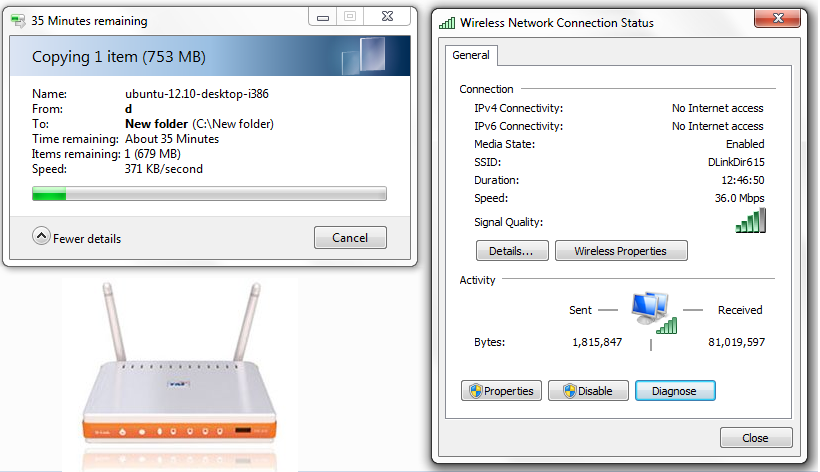
In laymen terms, the Asus was 23 times faster than the D-Link (Twenty Three!!). Also important to note that the 371KB/s is slower than your Unifi connection–making the WiFi a bottle neck.
In short if you live in a double-storey house, the standard D-Link router isn’t going to give you the best experience your Unifi connection can achieve. Instead you’ll be limited to poor network connectivity that degrades exponentially for every bit of distance you put between your router and device.
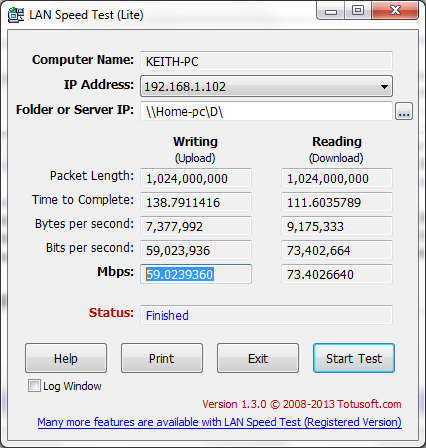
Further testing the LAN speed only serve to prove my point. Running the same test on the N12 HP, reveal a standard transfer rate of about 8-9MB/s. That works out to around 64-72Mbps (although the screenshot below says 59-73), which is roughly 50% of the theoretical limit of the 802.11n. There’s still room for improvement, but that’s probably as quick as you’re going to get with an entry level router.
Other features
The Asus also comes with some other rather nifty features, including Parental control, multiple SSIDs and even QoS. Though these features are best left untouched if you don't know what you're doing.The one ‘silent’ feature that the router offers, that isn’t offered on the standard D-Link router is loopback functionality.
Loopback is a really good feature to have on your router, specifically if you’ve got a tonne of IP cameras or devices at home. Basically a loopback on a router allows you to access your devices via DDNS from within your own LAN, which means your apps need only be configured once, and they’d be able to access your IP cameras via DDNS from both outside your network, and within it.
A lot of readers have wrote to me about this, since the standard D-Link router can’t handle it. So if you want too access your cameras from your home network–try an Asus router.
Security features
Finally we focus on the reason I decided to change routers in the first place--security. Routers are computers in their own right, they can run their own code and even execute commands. Therefore they should be subjected to the same security practices as regular PCs, Macs and laptops. This is one of those cases where less is more--there have been multiple disclosures of vulnerabilities on Asus routers such as this and this. Including one published few weeks ago in Defcon.In most cases these targeted vulnerabilities associated with the AI cloud and fileserver. These extra features also provide extra failure points for hackers to exploit. In situations like this a router with less features, like the N12, is actually more secure than their feature rich, expensive cousins. Like I said–less is more.
Don’t be fooled though, both the TP-Link and D-Link routers have their fair share of exploits as well. No one router is perfect, what makes your router secure isn’t the firmware it’s shipped with, but the attitude of the provider. Let’s hope Asus takes security seriously and publishes fixes for those exploits.
Conclusion
At Rm200, this router isn't cheap, but I would recommend it as a way of improving your home Wireless connectivity and improve your router security.Pros:
-Gorgeous black finish compliments any TV area-Improved signal strength
-No known security issues (only reported Asus exploits deal with Cloud AI)
Cons:
-Rm200 is a pretty steep price for a basic router. Standard TP-Link and other Asus routers come in at the Rm150 price range.-Long Antenna might make this hard to hide.
-No fileserver or bit-torrent funtionality
Archived Comments